
Service
Enterprise Wi-Fi Installation in Colombo & Sri Lanka
We plan and install Wi-Fi for offices, hotels, warehouses and factories in Colombo and across Sri Lanka, so coverage holds up where people actually work — including the warehouse aisle, the far meeting room and the floor where everyone connects at once.
In summary
TKWIT plans and installs Wi-Fi for offices, hotels, warehouses, factories, retail and schools. Coverage is designed around access point placement and device density, so it holds up where people actually work. We deliver in Colombo and across Sri Lanka.
Talk to the installer
Discuss Wi-Fi installation directly with TKWIT
TKWIT is a Sri Lankan systems integrator, not only a product seller: our own team surveys, designs, installs, tests and supports the system. Our Colombo-based team plans, installs, tests and supports projects across Sri Lanka, including Colombo 01–08 and Port City Colombo.
- Wireless site survey of the actual floor, walls and user density
- Access point placement with PoE cabling and switch ports planned
- Router/firewall and switch set-up, with separate guest and staff networks (VLANs) where the equipment supports it
- Coverage testing after installation, documentation and support
Office Wi-Fi dropping or slow? Tell us the building and the symptoms; adding another router rarely fixes it.
Offices: Turnor Road, Colombo 08 and Iswari Road, Colombo 06. We reply to every enquiry as soon as we can.
One-day Wi-Fi resolution service guarantee
Only eligible Wi-Fi fault types covered by a written service agreement qualify. The one-day clock begins from an acknowledged qualifying ticket with site access granted. The SLA defines coverage, exclusions and remedies. This is not an unconditional 24-hour repair promise for all hardware or ISP faults.
Discuss fault eligibility and a written service agreementAdding another router rarely fixes weak Wi-Fi; it usually makes it worse. Coverage problems are almost always about access point placement, the number of devices per area, and how the building itself absorbs signal — which is why the survey matters more than the hardware. TKWIT is an Official UniFi Partner. For UniFi deployments, we scope access points, VLAN separation, gateway routing and central administration around your existing network; dual-ISP failover is included where the agreed design requires it.
Documented site account: Completed Orion City Colombo dual-ISP UniFi deployment and project gallery
Documented site account: Colombo office Wi-Fi, network cabling and CCTV installation walkthrough (2025)
Or call +94 777 067 580
What's included
What does enterprise Wi-Fi installation include?
Everything below is part of the scope we agree in writing before work starts.
Free site survey
The initial site survey and advice is free. We walk the site, measure existing coverage and interference, and identify what walls, racking, lift shafts and equipment are doing to the signal.
Access point layout
A plan of how many access points go where, at what mounting height and orientation, based on the areas that must work rather than even spacing on a floor plan.
Cabling and PoE
Data cabling to each access point position with switch power sized for the load, so power supplies are not improvised at ceiling level.
Configuration and tuning
Channels, power levels, band steering and roaming set up so devices move between access points cleanly instead of clinging to a distant one.
Networks and guest access
Separate networks for staff, guests, and devices such as cameras and payment terminals, so a visitor's phone is not on your internal network.
Coverage testing
Verification walk after installation across the areas you named, with adjustments until they actually pass.
Troubleshooting existing Wi-Fi
Diagnosing dead spots, drop-outs and slow-when-busy complaints on installations we did not put in.
Who it's for
Sites we do this work on
If your situation is not listed, ask anyway — we will tell you honestly whether it is work we do.
- Offices where meeting rooms and corners drop out
- Hotels and guesthouses needing coverage in every room and public area
- Warehouses using handheld scanners along racked aisles
- Factories with production areas, offices and yards on one site
- Restaurants, cafés and retail offering guest Wi-Fi alongside business systems
- Schools, clinics and offices with many devices in one area at once
Planning & design
What we work out before quoting
These are the decisions that determine whether the finished system is useful or merely installed.
- Coverage or capacity?
- A quiet warehouse needs coverage; a full meeting room needs capacity. They lead to different access point counts in the same square footage.
- Buildings absorb signal
- Concrete, metal racking, tinted glass, lift shafts and cold rooms all attenuate Wi-Fi. This is why a survey on the actual site beats any calculation from a drawing.
- Roaming across the site
- People walking with a phone or a scanner need handover between access points. Getting this wrong is what causes calls to drop while walking.
- Cabling determines placement
- An access point can only go where a cable can reach. Planning cabling and wireless together avoids compromised positions.
- Guest and device separation
- Guest traffic, staff devices and site equipment belong on separate networks, decided at design rather than bolted on later.
- Your internet connection is the ceiling
- Excellent Wi-Fi cannot exceed the connection behind it. Where the link is the real constraint, we say so instead of selling more access points.
- Outdoor and between-building links
- Yards, car parks and separate blocks need equipment rated for outdoor conditions and a different approach to mounting and links.
How it works
Our implementation process
The same order every time, so you always know what stage the project is at.
- 01
Requirement discussion
Which areas must work, how many devices, and what is failing today.
- 02
Wireless survey
On-site measurement of coverage, interference and building conditions.
- 03
Design and quotation
Access point count and positions, cabling, switch and power requirements.
- 04
Cabling and installation
Runs to each position, mounting and PoE switching.
- 05
Configuration
Networks, guest access, channels, power and roaming behaviour.
- 06
Verification walk
Coverage tested across the named areas and tuned until it passes.
- 07
Handover
Network details, access arrangements and a briefing for whoever manages it.
On site
Photographs from this type of work
Taken on TKWIT installations in Sri Lanka.
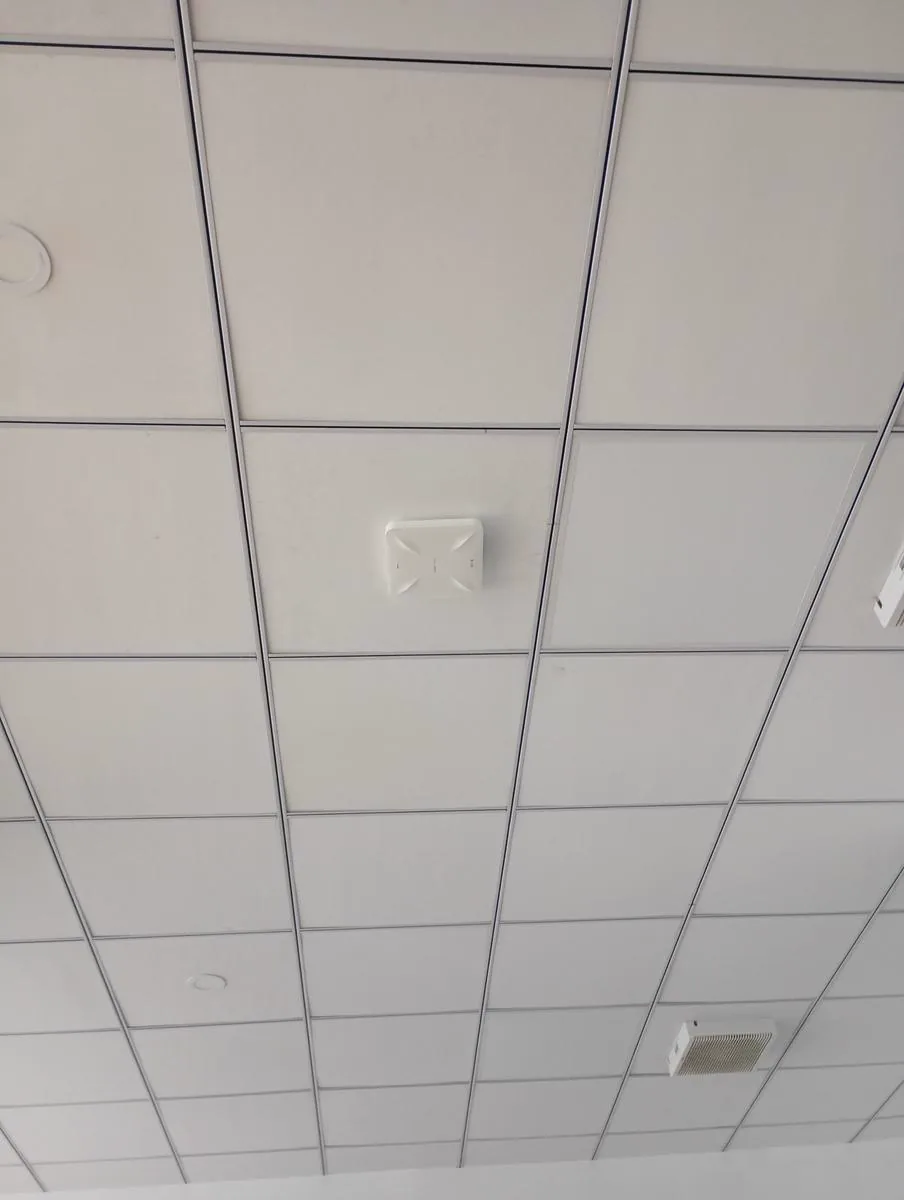 Wi-Fi
Wi-FiCeiling-mounted wireless access point installation
Afterwards
Maintenance and support
Installation is the start of the relationship, not the end of it.
- Coverage checks after layout, racking or partition changes
- Adding access points as areas or device counts grow
- Re-tuning when a new site or neighbour changes the interference picture
- Fault attendance for drop-outs and dead spots
- Maintenance alongside network and cabling support
Questions
Frequently asked
- What does the one-day Wi-Fi resolution service guarantee cover?
- Only eligible Wi-Fi fault types covered by a written service agreement qualify. The clock begins from an acknowledged qualifying ticket with site access granted. The SLA defines coverage, exclusions and remedies; it is not an unconditional 24-hour repair promise for all hardware or ISP faults.
- What is included in TKWIT's Wi-Fi installation service?
- TKWIT handles full-scope enterprise Wi-Fi installation including on-site wireless surveys, access point layout design, data cabling, PoE switch setup, channel tuning, VLAN network separation, and post-installation coverage verification walks.
- How does TKWIT separate guest and internal business Wi-Fi traffic?
- We configure isolated virtual networks (VLANs) and guest portals to ensure visitor devices remain separate from corporate internal networks, payment terminals, and CCTV infrastructure.
- Does TKWIT provide Wi-Fi installation outside Colombo?
- Yes, TKWIT provides Wi-Fi site surveys and installations across Colombo, its suburbs, and island-wide throughout Sri Lanka for single sites and multi-branch rollouts.
- Why is our Wi-Fi weak even though the router is new?
- Because one device in one location cannot cover a building. Weak coverage is nearly always a placement and access point count problem, not a hardware generation problem.
- Do you need to visit before quoting?
- For anything beyond a small space, yes. A wireless survey is what makes the access point count honest — quoting Wi-Fi from a floor plan tends to be wrong in both directions.
- Our scanners drop connection while staff walk the aisles.
- That is usually a roaming and coverage-overlap issue between access points. It is a common warehouse problem and it is fixable by re-planning placement and tuning, not by replacing scanners.
Related
What people usually ask about alongside this
Network Cabling
We install and repair network cabling for offices, warehouses and industrial sites in Colombo and across Sri Lanka — data points, cable routes and rack work that is neat, labelled, tested and easy to work on later.
See Network CablingStructured Cabling
Structured cabling is the designed version of data cabling: one planned system serving the whole building, documented so anyone can work on it afterwards. We design and install it for offices, hotels and industrial buildings in Colombo and across Sri Lanka.
See Structured CablingIP PABX & Phone Systems
We design, install and support IP PABX phone systems — extensions, menus, call routing and recording — running over the network you already have.
See IP PABX & Phone Systems
Planning a specific project?
- Business Wi-Fi Installation in Colombo — business wi-fi
- Office Network & IT Infrastructure Setup in Colombo and Sri Lanka — office network projects
FAQ
Wi-Fi Installation: more questions answered
How long does an enterprise Wi-Fi deployment usually take in Sri Lanka?
The timeframe depends on the size of the site, number of access points, cabling requirements and whether a wireless survey is needed. A small office may be completed within a few days, while hotels, campuses, warehouses and multi-floor buildings require a structured survey, design and phased deployment.
Can TKWIT improve an existing Wi-Fi network without replacing everything?
Yes. TKWIT can assess existing access points, cabling, switches, coverage and interference before recommending changes. In many cases, performance can be improved through better access-point placement, channel planning, configuration or selective equipment upgrades.
Do you provide Wi-Fi site surveys in Colombo and other parts of Sri Lanka?
Yes. TKWIT provides wireless assessment and enterprise Wi-Fi design for offices, commercial buildings, hospitality environments, warehouses and other business locations in Colombo and across Sri Lanka.
Can you separate staff, guest and IoT devices on the same Wi-Fi network?
Yes. Enterprise networks can be designed with separate SSIDs, VLANs and security policies for employees, guests, CCTV, IoT devices and other systems while using the same underlying infrastructure.
Next step
Let's build the right technology infrastructure for your business.
Share your requirement and our engineers will assess the environment, propose a design and outline a realistic implementation plan.